Exercise Set 01: Commands, Env, and Volumes
Exercise 1 — Command & Args Basics
Create a Pod named echo-pod in the default namespace using the busybox image.
- The container should print the message
Hello from CKAevery 5 seconds in an infinite loop. - Write the loop as a shell command using
commandandargsfields (not baked into the image). - The pod should restart automatically if it exits.
Verify by checking the logs.
Exercise 2 — Args from Environment Variables
Create a Pod named greeter using the busybox image.
- Define an environment variable
GREETINGwith the valueKubernetes is fun. - The container should run a shell command that prints the value of
GREETINGonce and then exits. - Use
argsto pass the shell command; usecommandonly to invoke the shell.
Exercise 3 — ConfigMap as Environment Variables + Volume
Create a ConfigMap named app-config in the default namespace with the following data:
APP_ENV=production
LOG_LEVEL=debug
Then create a Pod named config-reader using the busybox image that does both of the following:
- Injects
APP_ENVandLOG_LEVELas environment variables from the ConfigMap. - Mounts the entire ConfigMap as a volume at
/etc/config. - On startup, runs a shell command that prints both env vars AND then
cats every file under/etc/config.
Exercise 4 — Secret Mounted as Volume
Create a Secret named db-creds with the following literal values:
username=admin
password=s3cr3t
Create a Pod named secret-reader using the busybox image that:
- Mounts the secret as a volume at
/etc/secrets. - Runs a command that reads and prints the contents of both
usernameandpasswordfiles from that path. - Does not use
secretKeyRefenv vars — only the volume mount.
Exercise 5 — Init Container Writing to a Shared Volume
Create a Pod named init-writer with:
- An init container using
busyboxthat writes the textinitialized at $(date)into a file at/work-dir/status.txt. Use command substitution in the shell command. - A main container using
busyboxthat reads/work-dir/status.txt, prints it, then sleeps indefinitely. - Both containers share an
emptyDirvolume mounted at/work-dir.
Exercise 6 — Sidecar Sharing a Log Volume
Create a Pod named log-app with two containers:
Container 1 — writer using busybox:
- Every 3 seconds, appends a line like
log entry: <number>(incrementing) to/var/log/app/out.log. - Uses a shell loop with a counter variable.
Container 2 — reader using busybox:
- Runs
tail -f /var/log/app/out.log.
Both containers share an emptyDir volume at /var/log/app.
Verify that kubectl logs log-app -c reader shows the entries being written by the writer.
Exercise 7 — Downward API as Environment Variables
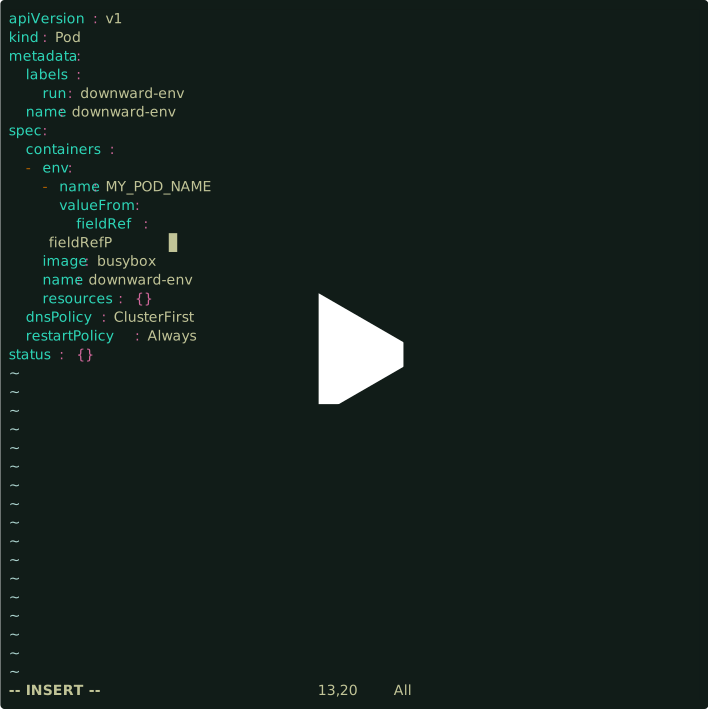
Create a Pod named downward-env using the busybox image that exposes the following as environment variables using the Downward API:
MY_POD_NAME→ the pod's nameMY_POD_NAMESPACE→ the pod's namespaceMY_NODE_NAME→ the node the pod is scheduled on
The container should print all three values on startup and exit.
Exercise 8 — Downward API as a Volume
Create a Pod named downward-vol using the busybox image that:
- Mounts pod metadata (specifically:
name,namespace, andlabels) as files under/etc/podinfousing a Downward API volume. - Add at least two labels to the pod (
app=downward-vol,tier=backend). - On startup,
cats all files under/etc/podinfo.
Exercise 9 — Combined: ConfigMap + Secret + Downward API + Shared Volume
Create the following in the default namespace:
- A ConfigMap
pipeline-configwith keysMODE=batchandTIMEOUT=30. - A Secret
pipeline-secretwith keyAPI_KEY=abc123xyz.
Create a Pod named pipeline-runner with two containers:
Container 1 — setup (busybox, runs once then exits):
- Has
MODEandTIMEOUTinjected as env vars from the ConfigMap. - Has
API_KEYinjected as an env var from the Secret. - Also exposes
MY_POD_NAMEvia Downward API as an env var. - Writes a file
/shared/config-dump.txtcontaining all four values (one per line, labeled).
Container 2 — runner (busybox):
- Waits for
/shared/config-dump.txtto exist (poll in a loop), then prints its contents and sleeps.
Both share an emptyDir at /shared.
Exercise 10 — Deployment with Configurable Replicas and Command Override
Create a Deployment named worker in namespace tasks (create it if needed) with:
- 3 replicas, image
busybox. - A ConfigMap
worker-configin the same namespace with keyINTERVAL=10. - Each pod injects
INTERVALfrom the ConfigMap as an env var. - The container runs: sleep
$INTERVALin a loop, printingworker sleeping for $INTERVAL secondsbefore each sleep. - Set a
restartPolicythat keeps the containers running.
Then, without deleting the deployment, update the INTERVAL value in the ConfigMap to 5 and confirm the behavior changes after the pods are restarted.